Link purchasing system OCI or cXML
Some organizations use purchasing systems. Ecmanage can work together with these systems if Ecmanage's validation logic remains active and Ecmanage's shopping cart is used on the basis of an individual login of an orderer.
There are two models that we support, an OCI variant and a cXML variant.
Integration Purchase systems
The schedule below shows how the collaboration can be between Purchasing System, Ecmanage and ERP system.
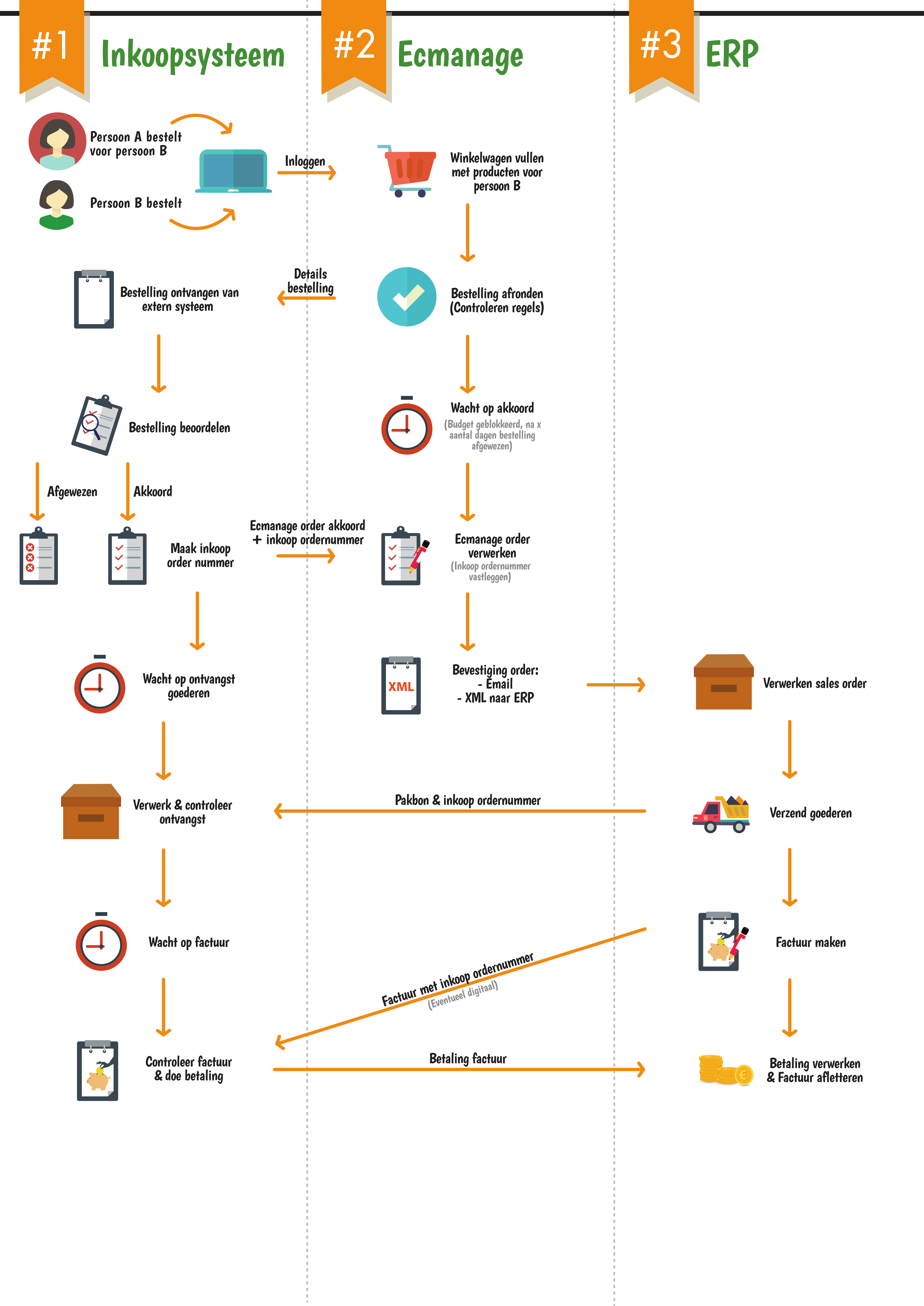
The integration between Ecmanage and purchasing systems via OCI can also work using a single sign on option. In this way, an orderer is immediately recognized by Ecmanage without having to log in separately. In the cXML variant, logging in is solved by means of an extrinsic and a shared secret.
Template controlled shopping cart OCI
When configuring the purchasing system link in Ecmanage, a mapping can be made of the Ecmanage order data to your purchasing system by means of a template.
An example:
OCI Field | Value | Explanation | |
|---|---|---|---|
1 | New_item-vendormat[1] | 58561_6200-34 | rangeid |
2 | New_item-description[1] | Women's Uniform Pants Black | |
3 | New_item-matgroup[1] | Broek | Product group |
4 | New_item quantity[1] | 1 | |
5 | New_item-unit[1] | Stuk | |
6 | New_item-currency[1] | Eur | |
7 | New_item-price[1] | 36.55 | |
8 | New_item-cust-field1 | 21 | Vat |
9 | New_item-cust-field3[1] | Custdemo215559 | Order code ecmanage |
cXML order flow
For example, in that message we expect the following dates:
cXML.Header.From.Credential.Identity = CUSTOMER
cXML.Header.To.Credential.Identity = LEVERANCIER
cXML.Header.Sender.Credential.SharedSecret =
cXML.Request.PunchOutSetupRequest.BuyerCookie =
cXML.Request.PunchOutSetupRequest.BrowserFormPost.URL = valid url for post
cXML.Request.PunchOutSetupRequest.Extrinsic[name="User"] = Unique user name known in Ecmanage.
If everything is valid, a PunchOutSetupResponse cXML message will be sent with the correct StartPage. This page is only valid for a few hours.
With the StartPage, a user can start an order. At the end, the shopping cart will be returned with a PunchOutOrderMessage. That message contains the Ecmanage order number field in cXML.payloadID. That is the unique identification of an order in Ecmanage. The purchase system can then approve the shopping cart, in which case a purchase order number will be linked to the shopping cart and an order confirmation is sent in a PunchOutOrderMessage. The response to that message is a status message, this status indicates whether the message is correct (200 is correct, 400 is error the order is then not processed).
Record approval purchase order
For registering a purchase order that has been approved, an https POST message can be used with a cXML payload. In that cXML message contains a reference to the Ecmanage order number and the purchase order number.
Field | Value |
|---|---|
OrderRequestHeader.SupplierOrderInfo[orderID] | Ecmanage order number |
OrderRequestHeader[orderID] | Purchasing system order number |
Optie 1: SupplierOrderInfo
Optie 2: OrderRequestHeader Extrinsic
Optie 3: Item SupplierPartAuxiliaryID
Optie 4: ItemDetail Extrinsic
Example Procurement systems
A number of example integrations based on OCI and cXML:
Afas purchasing via OCI
Jaggaer procurement
Oracle Acquisition
Proactive
https://www.opuscapita.com/solutions/source-to-pay/eprocurement